
What you build
Object storage at any company holds two kinds of data. Structured data covers CSV, JSON and Parquet, which hold the fact tables, the exports, the CDC feeds and the reference data. Unstructured data covers PDF, DOCX, TXT, images and video, which hold the contracts, the tickets, the reports and the recordings. Many teams keep the unstructured files on a NAS and read them through an object-storage client rather than from a bucket directly.
The standard RAG setup puts the vectors somewhere else. A job chunks the documents, embeds the chunks, and loads them into a vector index, which is either pgvector in Postgres or a dedicated store such as Milvus, Qdrant or Chroma. Similarity search then runs against that index. Your choice of store matters less than one fact: the index is a different system from the one that holds the fact tables. So a question needs two systems when it asks both “what does the contract say” and “which of our contracts are still active in this region”, and you must stitch the answer together across both.
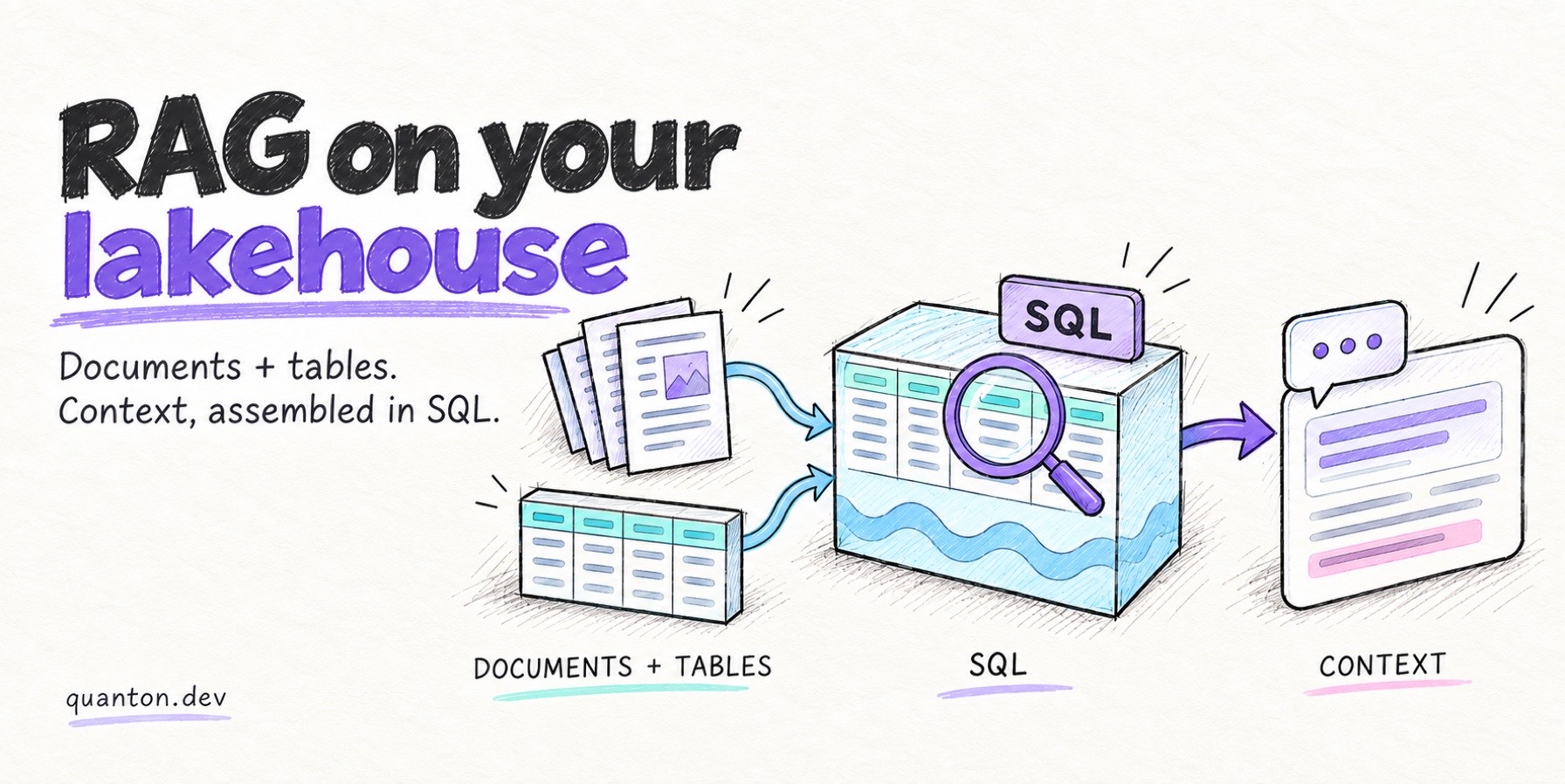
This guide keeps both kinds of data in one place. One engine reads the documents and the structured files, and both land as tables in the lakehouse. One SQL query then ranks rows by vector similarity, and the same statement filters and joins against your relational data.
The examples use CUAD, a Hugging Face dataset of real commercial contracts where lawyers already marked which clauses appear in which document. The PDFs are the unstructured side, and the labels are the structured side.
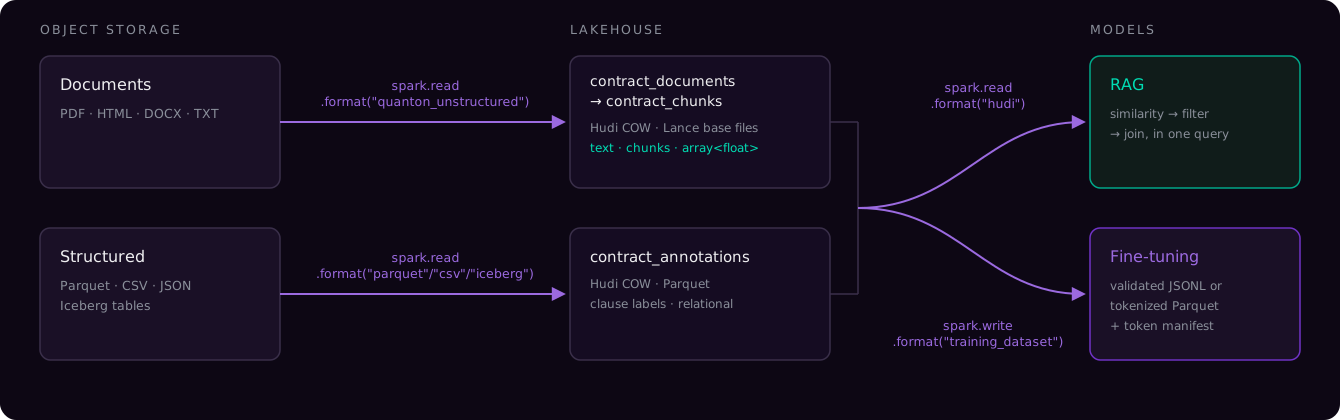
Four steps:
object storage                  contract PDFs + an annotations CSV
s3:// · gs:// · abfss://        (or a NAS mount through an object-storage client)
   │  spark.read.format("quanton_unstructured")
   ▼
contract_documents              Hudi COW · Lance base files · text, chunks, content
   │  explode chunks → embed
   ▼
contract_chunks                 Hudi COW · Lance base files · array<float> embeddings
   │  rank by similarity, filter and join in SQL
   ▼
contract_annotations            Hudi COW · Parquet · the clause labels, joined at query time
Everything below runs on Quanton.
Setup
The Quanton image ships quanton_unstructured, Hudi, Lance and the Spark configs that they need, so the session needs one line:
spark = SparkSession.builder.appName("rag_demo").getOrCreate()You choose the embedding model, because different corpora and different languages suit different models, and your team may already use one model everywhere. Install the model that you use:
pip install sentence-transformersThis guide uses BAAI/bge-base-en-v1.5, which runs on CPU, carries the Apache-2.0 licence, and has a 512-token window that fits the default chunk size. See choosing a model below for the checks to make.
Step 1 — Read the documents
import quanton_unstructured
quanton_unstructured.register(spark)

docs = spark.read.format("quanton_unstructured").load("s3://bucket/contracts/")
The reader returns one row per file, and it selects the parser per file for PDF, HTML, Office and plain text. A file that the reader cannot parse does not stop the job. That file lands as a row carrying a status and the reason for the failure, so you can query for the failures and repair them.
| Column | What it holds |
|---|---|
uri | the full path, and a natural record key for upserts |
size, modification_time | the values that object storage lists |
content_type | detected from the magic bytes of the file, so a wrong extension does not route the file wrong |
content | the file itself: raw bytes inline when the file is small, and a path/offset/length pointer when the file is large |
text | the extracted text |
chunks | array<string>, pre-split and ready to embed |
parse_status | SUCCESS, FAILED, or STRUCTURED_DATA for CSV, JSON and Parquet, which the reader leaves to the native readers instead of a text extractor |
parse_error | the reason, when the parse failed |
parser_used, chunker_used | the parser and the splitter that ran |
Step 2 — Land it in Hudi on Lance base files
Hudi 1.2 can write Lance base files, so the text, the chunk array and the embedding vector all sit in one copy-on-write Hudi table:
(docs.where("parse_status = 'SUCCESS'")
     .write.format("hudi")
     .option("hoodie.table.name", "contract_documents")
     .option("hoodie.datasource.write.recordkey.field", "uri")
     .option("hoodie.table.base.file.format", "LANCE")
     .mode("overwrite")
     .save(path))
The annotations CSV goes in as its own Hudi table on Parquet base files, in the same lakehouse and with ordinary relational columns.
The record key uri makes the job incremental. Run the job again after a batch of contracts changes, and Hudi upserts only the changed files in place rather than appending duplicates. So you can answer “did the sales agreement change after the new pricing sheet landed?” from the table, and downstream jobs read only the changed rows instead of the whole corpus.
The record key also gives you a second attempt at the documents that failed. Filter on parse_status = 'FAILED' and read parse_error. Fix the cause, such as a missing extra for that file type, a corrupt scan, or a size limit. Then run the job again. The good rows stay in place, and only the repaired rows change.
Step 3 — Embed the chunks
The reader already split the text. Explode the array to one row per chunk, then embed each chunk:
chunks = (
    docs.select("uri", "file_name", F.posexplode("chunks").alias("pos", "chunk"))
        .withColumn("chunk_id", F.concat_ws("#", "uri", "pos"))
)

def embed_partition(iterator):
    from sentence_transformers import SentenceTransformer
    model = SentenceTransformer("BAAI/bge-base-en-v1.5", device="cpu")
    for pdf in iterator:
        vecs = model.encode(pdf["chunk"].tolist(), batch_size=64,
                            normalize_embeddings=True)
        pdf["embedding"] = [v.tolist() for v in vecs]
        yield pdf

embedded = chunks.repartition(8).mapInPandas(embed_partition, schema=EMBED_SCHEMA)
mapInPandas loads the model one time per worker instead of one time per row. normalize_embeddings=True scales every vector to unit length, which lets the later similarity query use a plain dot product.
Write the result back as another Hudi table on Lance base files, keyed on chunk_id, which is uri#pos. Each chunk then keeps a stable identity across runs, and embedding a document again upserts its chunks in place. The id also points back to the source file, which matters when you must trace a retrieved chunk to its contract.
Choosing an embedding model
Check three things, in the order that they cause the most trouble.
The context window against your chunk size. The default chunkSize is 2000 characters, which holds about 500 tokens of English prose, and a model with a shorter window truncates the chunk. The model all-MiniLM-L6-v2 is the default in most tutorials and caps at 256 tokens, so it embeds about half of each chunk and returns a well-formed vector for that half. It reports no error and no warning. Keep the model context at or above chunkSize / 4 tokens, or make the chunks smaller.
The domain and the language. General-purpose models work well on general prose. Benchmark first for legal, medical and code corpora, and for any language other than English.
Where the model runs. sentence-transformers models run locally on CPU or GPU, so the corpus stays inside your VPC. Hosted models from OpenAI, Voyage, Cohere and others need one API call and often score higher, and in exchange you send your documents to a third party and pay per token. Both options work here, because you own the embedding step and the connector’s work ends when the chunks reach the table.
Step 4 — Retrieve with SQL
The vectors are a column in a table, so retrieval is a query:
WITH scored AS (
    SELECT c.file_name, c.pos, c.chunk,
           aggregate(zip_with(c.embedding, q.v, (a, b) -> a * b),
                     0.0F, (acc, x) -> acc + x) AS cosine
    FROM chunks c CROSS JOIN q
)
SELECT file_name, pos, cosine, substring(chunk, 1, 140) AS excerpt
FROM scored ORDER BY cosine DESC LIMIT 5
zip_with multiplies the two vectors element by element, and aggregate sums the products. The result is a dot product, which equals the cosine because both vectors have unit length. The q view holds the single query vector.
This query scores every chunk, which works at this size but will not work at tens of millions of chunks. Approximate-nearest-neighbour search over the same tables is a separate topic, and a guide on it is coming.
Context needs more than similarity
The useful questions do not stop at “which chunks look like this sentence”. They look like “what do our active contracts in Germany say about termination”. The embedding does not hold active or Germany; columns in the structured tables hold them, and those tables sit next to the chunks.
So the real query ranks by similarity and filters and joins in one statement:
SELECT c.chunk, m.renewal_date, a.clause_type
FROM chunks c
JOIN contract_metadata m ON m.file_name = c.file_name
LEFT JOIN annotations   a ON a.file_name = c.file_name
WHERE m.status = 'active' AND m.jurisdiction = 'DE'
ORDER BY cosine DESC
LIMIT 5
The WHERE clause runs before the ranking, so you rank only the candidates that qualify rather than ranking everything and discarding most of the result.
Some questions are not retrieval at all. “Which clause types do we have coverage for?” is a GROUP BY over the labels and the chunks together, and it needs no nearest-neighbour search:
+---------------------------+-------------------+------------------+
|clause_type                |annotated_contracts|retrievable_chunks|
+---------------------------+-------------------+------------------+
|Anti-Assignment            |...                |...               |
|Termination For Convenience|...                |...               |
|Exclusivity                |...                |...               |
|Non-Compete                |...                |...               |
+---------------------------+-------------------+------------------+
A CSV supplied the labels. PDFs supplied the chunks. One GROUP BY reads both.
That is the case for assembling context where the data already sits. Building the context that an LLM sees is a data engineering job, and it needs joins, filters, aggregates and window functions over documents and tables together. The lakehouse already holds both, so Quanton does that assembly and no separate system stitches results together afterward.
Serving the context to an application is a different problem, because it needs millisecond lookups, high concurrency and transactional reads. Lakegres does that job. It is a Postgres-compatible endpoint over the same Hudi and Iceberg tables, and it adds vector search and intelligent indexing on top of them. Point your existing Postgres clients at it, and the application queries the context that you assembled here with no copy drifting out of sync.
Run it yourself
The rag-and-fine-tuning demo in the quanton-operator repo runs these four steps end to end on the real CUAD corpus. It fetches the contracts, writes both Hudi tables, embeds the chunks and answers the question above. Runs on a local minikube (4 CPUs / 8 GB RAM).
kubectl apply -f quanton-rag-demo.yaml
kubectl logs -f quanton-rag-demo-driver -n default
Step 1 reports what the reader found in the dump:
|application/pdf  |SUCCESS        |pypdfium2  |510  |
|text/html        |SUCCESS        |selectolax |2    |
|application/x-csv|STRUCTURED_DATA|NULL       |1    |
The demo embeds 400 chunks by default, so a laptop run finishes in minutes.
Run it with an agent
The repo ships a Claude Code skill — run-rag-demo — that runs the demo for you. Clone the repo, launch Claude, and invoke the skill:
git clone https://github.com/onehouseinc/quanton-operator
cd quanton-operator
claude
> /run-rag-demoIt lets you pick the retrieval demo, the fine-tuning export, or both, and reports how many of the retrieved contracts carry the expert label.
Where to go next
The same tables feed model training. quanton_llm_training exports a validated fine-tuning dataset from them, joining the chunks to the expert labels so that a human grounds each training example. From Lakehouse Tables to a Fine-Tuning Dataset covers that export.
The connector is a pure-Python package, and you can replace every piece. The parsers are pypdfium2, selectolax and markitdown, the splitter is langchain-text-splitters, and the embedding model is BGE through sentence-transformers. All of them carry permissive licences, and we rejected PyMuPDF because it carries the AGPL licence.
