Deploy Quanton on GKE
This guide walks through deploying the Quanton Operator on a new GKE cluster from scratch — from creating the cluster to running your first Spark job.
Prerequisites
- Google Cloud CLI installed and logged in
- Helm >= 3.x
- kubectl installed
- gke-gcloud-auth-plugin installed
onehouse-values.yamldownloaded from the Onehouse console
Resource and cluster setup
Step 1: Log in and set your project
gcloud auth login
List available projects and set the one you want to use:
gcloud projects list
gcloud config set project <project-id>
Step 2: Enable required APIs
gcloud services enable container.googleapis.com
Billing must be enabled on the project before APIs can be activated. If you see a FAILED_PRECONDITION billing error, link a billing account at https://console.cloud.google.com/billing/linkedaccount?project=<your-project-id> first.
Step 3: Create the GKE cluster
gcloud container clusters create quanton-gke \
  --zone us-west1-a \
  --num-nodes 2 \
  --machine-type n2-standard-4 \
  --cluster-version latest
This takes ~5 minutes. Use any zone — us-west1-a, us-central1-a, europe-west1-b, etc.
Step 4: Install the kubectl auth plugin
GKE requires gke-gcloud-auth-plugin for kubectl authentication. If you see a CRITICAL: ACTION REQUIRED warning during cluster creation, install it:
gcloud components install gke-gcloud-auth-plugin
Step 5: Configure kubectl
gcloud container clusters get-credentials quanton-gke --zone us-west1-a
kubectl get nodes
You should see 2 nodes in Ready state.
Step 6: Grant cluster-admin
GKE doesn't automatically grant cluster-admin to your user. Run this before installing any Helm charts:
kubectl create clusterrolebinding cluster-admin-binding \
  --clusterrole=cluster-admin \
  --user=$(gcloud config get-value account)
If this fails with a permissions error, grant yourself the roles/container.admin IAM role first:
gcloud projects add-iam-policy-binding <project-id> \
  --member=user:<your-email> \
  --role=roles/container.admin \
  --condition=None
Install the operators
Step 7: Install the Spark Operator
The Quanton Operator extends the kubeflow Spark Operator — install it first:
helm repo add spark-operator https://kubeflow.github.io/spark-operator
helm repo update

helm install spark-operator spark-operator/spark-operator \
  --namespace spark-operator \
  --create-namespace \
  --set "spark.jobNamespaces={default}"
Verify it's running:
kubectl get pods -n spark-operator
Step 8: Install the Quanton Operator
helm upgrade --install quanton-operator oci://registry-1.docker.io/onehouseai/quanton-operator \
  --namespace quanton-operator \
  --create-namespace \
  --set "quantonOperator.jobNamespaces={default}" \
  -f /path/to/onehouse-values.yaml
Verify the pods are running (may take ~30–60 seconds to initialize):
kubectl get pods -n quanton-operator
Expected output once ready:
NAME                                   READY   STATUS    RESTARTS   AGE
dp-proxy-deployment-xxxx-xxxxx         1/1     Running   0          60s
quanton-controller-xxxx-xxxxx          3/3     Running   0          60s
If pods show PodInitializing or 0/1, wait a moment and re-run the command.
Submit and monitor job
Step 9: Submit a test job
kubectl apply -f https://raw.githubusercontent.com/onehouseinc/quanton-operator/main/examples/quanton-application.yaml
Confirm the application was created:
kubectl get quantonsparkapplications -n default
Monitor the driver pod (may take 2–3 minutes while the Quanton image is pulled):
kubectl get pods -A | grep driver
You can also track the job in the Onehouse console under Jobs:
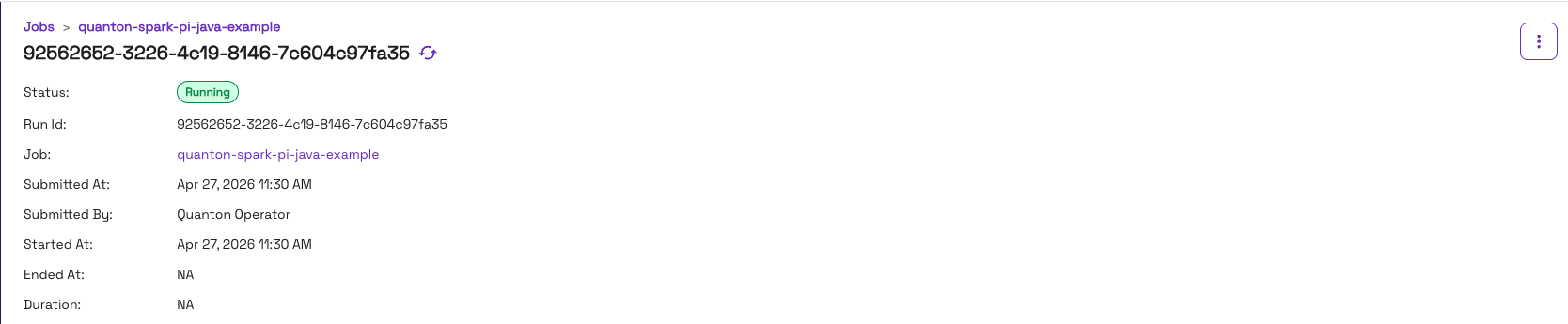
Once running, check the output:
kubectl logs -f quanton-spark-pi-java-example-driver | grep -i "pi is"
Expected output:
Pi is roughly 3.141592...
Once the job finishes, the console will show it as Completed:

Troubleshooting
ImagePullBackOff on quanton-controller
If kubectl get pods -n quanton-operator shows ImagePullBackOff on the quanton-controller pod, check the events:
kubectl describe pod -n quanton-operator <quanton-controller-pod-name> | grep -A 30 "Events:"
A TLS handshake timeout pulling from dist.onehouse.ai can indicate the GKE nodes can't reach the Onehouse image registry — or may be a transient failure that resolves on retry. First wait a minute and re-check pod status. If it persists, verify connectivity from inside the cluster:
kubectl run nettest --image=busybox --restart=Never -- \
  sh -c "wget -qO- https://dist.onehouse.ai 2>&1 || true" && \
  kubectl wait --for=condition=completed pod/nettest --timeout=30s 2>/dev/null || true && \
  kubectl logs nettest && \
  kubectl delete pod nettest
A 404 Not Found response confirms connectivity is working. See Network Configuration for the full list of required endpoints.
quanton-controller stuck at 0 replicas on GKE
If kubectl get all -n quanton-operator shows quanton-controller with 0/1 replicas and no pod is created, check the ReplicaSet events:
kubectl describe replicaset -n quanton-operator -l app=quanton-controller | grep -A 10 "Events:"
If you see insufficient quota to match these scopes: [{PriorityClass In [system-node-critical system-cluster-critical]}], GKE is blocking the pod because the chart sets priorityClassName: system-cluster-critical. GKE restricts this priority class to core system components at the cluster level.
Patch the deployment to remove the priority class:
kubectl patch deployment quanton-controller -n quanton-operator \
  --type=json \
  -p='[{"op": "remove", "path": "/spec/template/spec/priorityClassName"}]'
The controller pod should start within a few seconds.
Helm install forbidden errors
If Helm fails with clusterroles is forbidden, you haven't granted cluster-admin yet. See Step 6 above.
Cleanup
When you're done, delete the cluster to stop incurring charges:
gcloud container clusters delete quanton-gke --zone us-west1-a --quiet
Next steps
- Running Jobs — submit your own
QuantonSparkApplicationresources - GCP integration reference — GCS access via Workload Identity, node pools, and production setup