Deploy Quanton on Snowflake SPCS
If you just scanned our QR code — welcome. This is where you get started running Quanton inside your Snowflake account. Everything below is a working guide, but if you want to learn more about Quanton in general, see the homepage.
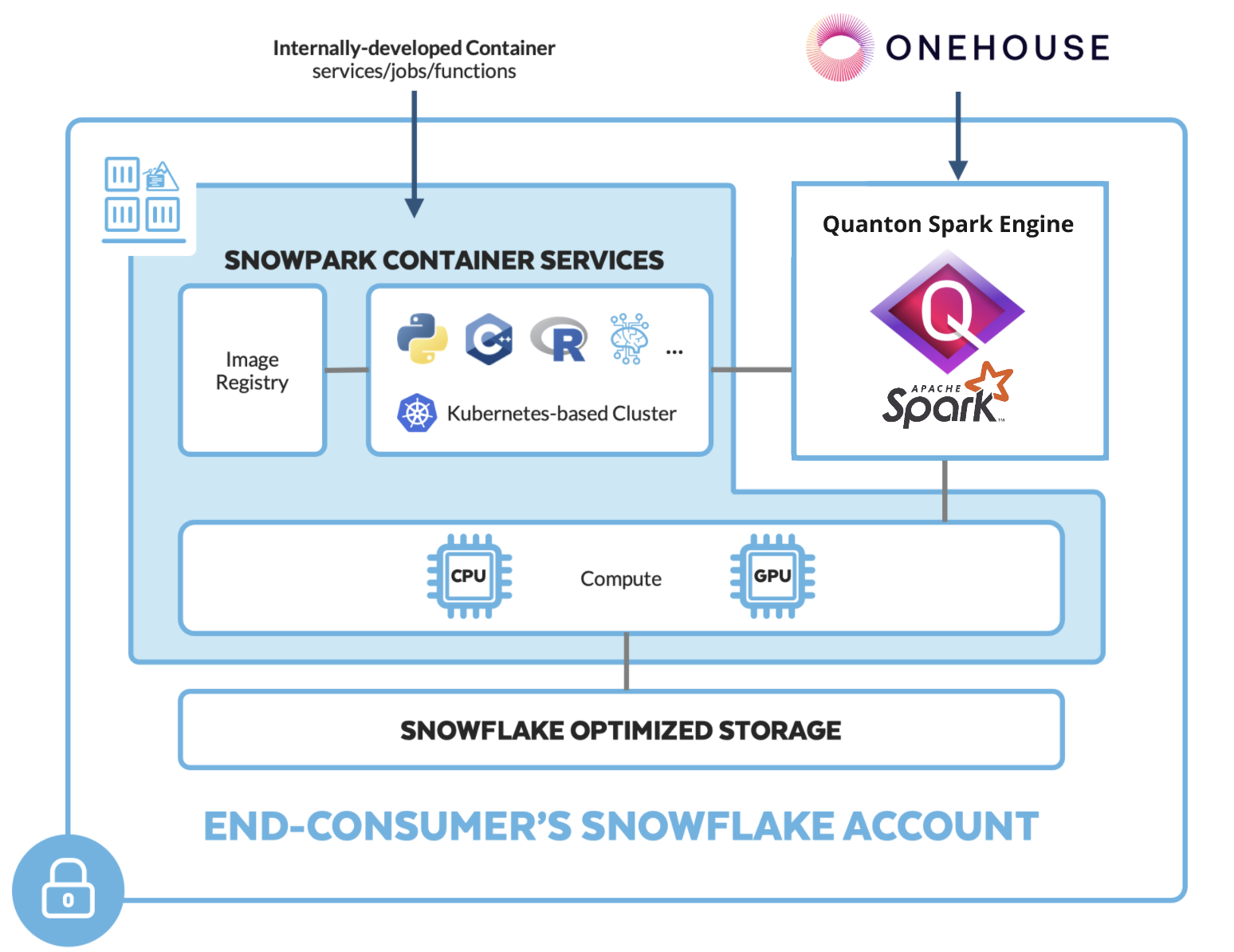
What is Quanton?
Quanton is a speed layer for Apache Spark, built by Onehouse. It replaces Spark's JVM execution engine with Velox — a vectorized, C++ runtime originally developed at Meta — so your existing Spark jobs run materially faster with no code changes. Same API, same DataFrame and SQL surface, same Hudi/Iceberg/Delta support. Just faster.
Running on Snowflake's infrastructure specifically, Quanton slots into Snowpark Container Services (SPCS): you bring your Spark workloads, Snowflake supplies the compute, and Quanton accelerates execution natively in C++. You control everything from Snowsight SQL worksheets — no cluster to manage, no custom Spark distribution to maintain.
What this guide covers: pushing the Quanton image to your Snowflake repository, storing a signed entitlement as a secret, and submitting two test jobs — a quick in-memory gate check to confirm everything is wired up, then a real Hudi write to S3. If you have a Snowflake account with ACCOUNTADMIN access, you can be running your first job in under an hour.
This guide walks through running Quanton with Velox native execution on Snowflake Snowpark Container Services (SPCS). Everything an operator does is run from the Snowsight UI (SQL worksheets) — the only step that needs a command line is a one-time image push, which a user with Docker access performs once.
How it works
SPCS is a bring-your-own-image runtime: Snowflake runs your container image directly, with no Spark fork to bridge. Quanton is delivered inside the onehouse-values.yaml you download — as a single base64 blob carried in the spark.quanton.onehouse.config Spark conf. You store that blob once as a Snowflake secret; the job reads it from there and configures itself.
This guide covers a single-node job, which is the simplest way to confirm Quanton runs in your account.
SPCS compute pools are x86_64 only (
CPU_X64_*/HIGHMEM_X64_*).
Prerequisites
- A Snowflake account with the
ACCOUNTADMINrole and Snowsight UI access (to create compute pools, external access integrations, secrets, and image repositories) - A Quanton on Snowflake (SPCS) project and its
onehouse-values.yaml— see Project Creation - An S3 bucket and AWS credentials with write access (for the Iceberg/Hudi writes in Step 6a / 6b)
- One-time, command-line: a user with Docker and the Snowflake CLI (
snow) to publish the image (Step 4). Everything else is Snowsight.
Setup
Step 1: Create a project and download credentials
In the Onehouse console, click on the project name, then click Create New Project.

In the dialog box, give the project an appropriate name, select Quanton on Snowflake (SPCS) under Cloud Provider, and hit Save.
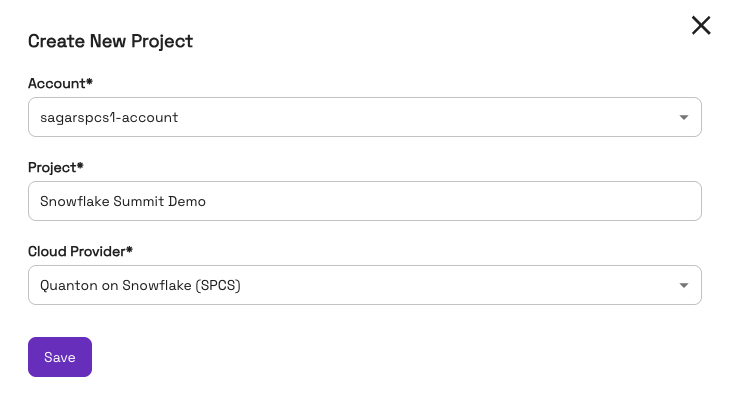
Download the resulting onehouse-values.yaml. It contains three things you'll use below:
| Value | Location in the file |
|---|---|
| Image | onehouseConfig.quantonSparkImage (must be …v0.18.0-al2023 or newer) |
| Image pull token | onehouseConfig.imagePullSecrets.accessToken |
| Entitlement blob | onehouseConfig.additionalSparkConfParameters."spark.quanton.onehouse.config" |
Step 2: Store your entitlement as a secret (Snowsight)
The entitlement blob holds a signed token and an mTLS client identity, so store it once as a Snowflake secret — encrypted at rest, and never pasted into a job. Open a SQL worksheet (role ACCOUNTADMIN) and run, pasting the spark.quanton.onehouse.config value from Step 1:
USE ROLE ACCOUNTADMIN;
CREATE DATABASE IF NOT EXISTS quanton_poc;
CREATE SCHEMA IF NOT EXISTS quanton_poc.spcs;

CREATE OR REPLACE SECRET quanton_poc.spcs.quanton_onehouse_config
  TYPE = GENERIC_STRING
  SECRET_STRING = '<paste the spark.quanton.onehouse.config value here>';
That's the only time you handle the blob. The job reads it from this secret and derives everything else (cloud, environment) on its own — you never set those by hand.
Step 3: Create Snowflake resources (Snowsight)
USE ROLE ACCOUNTADMIN;
USE SCHEMA quanton_poc.spcs;

-- Image repository — the push target for Step 4.
CREATE IMAGE REPOSITORY IF NOT EXISTS quanton_images;
SHOW IMAGE REPOSITORIES;   -- copy repository_url for Step 4

-- Egress: your S3 bucket AND the Onehouse control plane (the driver validates the
-- entitlement over mTLS against the control plane — this host is required).
CREATE OR REPLACE NETWORK RULE quanton_egress_rule
  TYPE = HOST_PORT MODE = EGRESS
  VALUE_LIST = (
    'gwc.onehouse.ai:443',
    's3.<your-region>.amazonaws.com',
    '<your-bucket>.s3.<your-region>.amazonaws.com',
    'sts.amazonaws.com'
  );

CREATE OR REPLACE EXTERNAL ACCESS INTEGRATION quanton_eai
  ALLOWED_NETWORK_RULES = (quanton_egress_rule) ENABLED = TRUE;

-- Single node is enough for this guide. HIGHMEM gives Velox room for off-heap.
CREATE COMPUTE POOL IF NOT EXISTS quanton_poc_pool
  MIN_NODES = 1 MAX_NODES = 1
  INSTANCE_FAMILY = HIGHMEM_X64_M
  AUTO_SUSPEND_SECS = 3600;   -- suspend after 1h idle

SHOW COMPUTE POOLS LIKE 'QUANTON_POC_POOL';  -- wait for state = ACTIVE (~2-3 min)
Copy the repository_url from SHOW IMAGE REPOSITORIES; it has the form
<account>.registry.snowflakecomputing.com/quanton_poc/spcs/quanton_images.
Step 4: Publish the image to your SPCS repository (one-time, command line)
SPCS only runs images from your account's own image repository, and pushing requires Docker — this is the single step that isn't done in Snowsight. A user with access to Docker + snow installed can complete this.
SPCS also can't run a vanilla Spark image directly, so wrap the Onehouse image with a tiny Dockerfile:
ARG BASE=dist.onehouse.ai/onehouseai/quanton-spark:quanton-operator-release-v0.18.0-al2023
FROM --platform=linux/amd64 ${BASE}
USER root
RUN yum install -y hostname
COPY gate_check.py /opt/spark/scripts/gate_check.py
COPY iceberg_write.py /opt/spark/scripts/iceberg_write.py
COPY hudi_write.py /opt/spark/scripts/hudi_write.py
Save the three job scripts from Step 5, Step 6a, and Step 6b next to the Dockerfile, then build and push (use the repository_url from Step 3):
# Pull the base image (token = imagePullSecrets.accessToken from onehouse-values.yaml)
echo "<image-pull-token>" | docker login dist.onehouse.ai -u onehouseai --password-stdin

# Push target = your Snowflake registry
snow spcs image-registry login
REPO=<repository_url>     # from Step 3
docker buildx build --platform linux/amd64 -t $REPO/quanton-spark-sfcs:v1 --load .
docker push $REPO/quanton-spark-sfcs:v1
Your image URI is <repository_url>/quanton-spark-sfcs:v1 — used in Steps 5 and 6. To confirm the push (back in Snowsight), SHOW IMAGES IN IMAGE REPOSITORY quanton_poc.spcs.quanton_images; lists each image's image_path — the full image: value is your registry host (the part of repository_url before the first /) followed by that image_path.
Run a job (single node)
The only thing you fill in below is your image URI (and, for the Hudi write, your S3 bucket + AWS credentials). The entitlement comes from the secret, and the container derives its cloud/environment from it automatically.
Step 5: Run the gate-check
This in-memory job (no S3, no AWS credentials) confirms the entitlement is accepted and Velox is live. Save it as gate_check.py for the Step 4 build:
import sys
from pyspark.sql import SparkSession, functions as F

spark = SparkSession.builder.appName("QuantonSFCS-GateCheck").getOrCreate()
print("[gate] SparkSession started — entitlement accepted")
print("[gate] plugins:", spark.conf.get("spark.plugins", "<unset>"))
df = (spark.range(0, 1_000_000).withColumn("b", F.col("id") % 1000)
      .groupBy("b").agg(F.count(F.lit(1)).alias("c")))
df.explain(True)
assert df.count() == 1000
print("[gate] PASS — Quanton backend up and query correct")
In Snowsight, submit it (the only thing to fill in is <your-image-uri>):
USE ROLE ACCOUNTADMIN;
USE SCHEMA quanton_poc.spcs;
DROP SERVICE IF EXISTS quanton_gate_check;

EXECUTE JOB SERVICE
  IN COMPUTE POOL quanton_poc_pool
  NAME = quanton_gate_check
  EXTERNAL_ACCESS_INTEGRATIONS = (quanton_eai)
  FROM SPECIFICATION $$
  spec:
    containers:
      - name: job
        image: <your-image-uri>
        secrets:
          - snowflakeSecret: quanton_poc.spcs.quanton_onehouse_config
            secretKeyRef: secret_string
            envVarName: QUANTON_ONEHOUSE_CONFIG
        command:
          - /bin/bash
          - -c
          - |
            echo "spark.quanton.onehouse.config ${QUANTON_ONEHOUSE_CONFIG}" >> /opt/spark/conf/spark-defaults.conf
            exec /opt/spark/bin/spark-submit --master 'local[*]' --driver-memory 8g /opt/spark/scripts/gate_check.py
        resources:
          requests: {cpu: "4", memory: "16Gi"}
          limits:   {cpu: "8", memory: "28Gi"}
  $$;
Check the result:
SELECT SYSTEM$GET_SERVICE_STATUS('quanton_poc.spcs.quanton_gate_check');          -- expect "DONE", exit 0
CALL SYSTEM$GET_SERVICE_LOGS('quanton_poc.spcs.quanton_gate_check', 0, 'job', 1000);
Success looks like:
[gate] SparkSession started — entitlement accepted
spark_native_listener: Extracted identity from mTLS cert org_id=…
[gate] PASS — Quanton backend up and query correct
Step 6a: Run an Iceberg write
Write a sample Iceberg table to S3 using a Hadoop catalog. Save as iceberg_write.py for the Step 4 build:
import sys
from pyspark.sql import SparkSession
from pyspark.sql.types import StructType, StructField, StringType, IntegerType, DoubleType

spark = SparkSession.builder.appName("QuantonSFCS-IcebergWrite").getOrCreate()
warehouse = sys.argv[1].rstrip("/")
schema = StructType([
    StructField("order_id", StringType(), False), StructField("product", StringType(), False),
    StructField("quantity", IntegerType(), False), StructField("price", DoubleType(), False),
    StructField("region", StringType(), False),
])
regions = ["US", "UK", "SG", "AU", "MX"]
rows = [(f"ORD{i:04d}", "Widget", (i % 5) + 1, round(9.99 + i, 2), regions[i % 5]) for i in range(1000)]
df = spark.createDataFrame(rows, schema)
spark.sql("CREATE NAMESPACE IF NOT EXISTS demo.sample_db")
(df.writeTo("demo.sample_db.quanton_spcs_orders")
   .using("iceberg")
   .partitionedBy(df.region)
   .createOrReplace())
cnt = spark.table("demo.sample_db.quanton_spcs_orders").count()
print(f"[iceberg] write complete: {warehouse} table=demo.sample_db.quanton_spcs_orders rows={cnt}")
assert cnt == 1000
print("[iceberg] PASS — Iceberg table written and readable")
The Iceberg Spark runtime ships in the image under /opt/spark/user-jars/, so add that directory to the classpath and point a Hadoop catalog at your S3 warehouse. Submit it with your S3 path, region, and AWS credentials:
USE ROLE ACCOUNTADMIN;
USE SCHEMA quanton_poc.spcs;
DROP SERVICE IF EXISTS quanton_iceberg_write;

EXECUTE JOB SERVICE
  IN COMPUTE POOL quanton_poc_pool
  NAME = quanton_iceberg_write
  EXTERNAL_ACCESS_INTEGRATIONS = (quanton_eai)
  FROM SPECIFICATION $$
  spec:
    containers:
      - name: job
        image: <your-image-uri>
        secrets:
          - snowflakeSecret: quanton_poc.spcs.quanton_onehouse_config
            secretKeyRef: secret_string
            envVarName: QUANTON_ONEHOUSE_CONFIG
        command:
          - /bin/bash
          - -c
          - |
            echo "spark.quanton.onehouse.config ${QUANTON_ONEHOUSE_CONFIG}" >> /opt/spark/conf/spark-defaults.conf
            exec /opt/spark/bin/spark-submit --master 'local[*]' \
              --conf spark.driver.extraClassPath=/opt/spark/user-jars/* \
              --conf spark.executor.extraClassPath=/opt/spark/user-jars/* \
              --conf spark.serializer=org.apache.spark.serializer.KryoSerializer \
              --conf spark.hadoop.fs.s3a.endpoint=s3.<your-region>.amazonaws.com \
              --conf spark.hadoop.fs.s3a.endpoint.region=<your-region> \
              --conf spark.sql.extensions=org.apache.iceberg.spark.extensions.IcebergSparkSessionExtensions \
              --conf spark.sql.catalog.demo=org.apache.iceberg.spark.SparkCatalog \
              --conf spark.sql.catalog.demo.type=hadoop \
              --conf spark.sql.catalog.demo.warehouse=s3a://<your-bucket>/<your-path>/iceberg-warehouse \
              --driver-memory 8g \
              /opt/spark/scripts/iceberg_write.py s3a://<your-bucket>/<your-path>/iceberg-warehouse
        env:
          AWS_ACCESS_KEY_ID: "<your-key>"
          AWS_SECRET_ACCESS_KEY: "<your-secret>"
          AWS_SESSION_TOKEN: "<your-token>"     # omit if using long-lived keys
        resources:
          requests: {cpu: "4", memory: "16Gi"}
          limits:   {cpu: "8", memory: "28Gi"}
  $$;
CALL SYSTEM$GET_SERVICE_LOGS('quanton_poc.spcs.quanton_iceberg_write', 0, 'job', 1000);
Expected: Committed snapshot …, [iceberg] write complete: …, and [iceberg] PASS.
Step 6b: Run a Hudi write
Now write a real Hudi table to S3. Save as hudi_write.py for the Step 4 build:
import sys
from pyspark.sql import SparkSession
from pyspark.sql.types import StructType, StructField, StringType, IntegerType, DoubleType

spark = SparkSession.builder.appName("QuantonSFCS-HudiWrite").getOrCreate()
path = sys.argv[1].rstrip("/") + "/quanton_spcs_orders"
schema = StructType([
    StructField("order_id", StringType(), False), StructField("product", StringType(), False),
    StructField("quantity", IntegerType(), False), StructField("price", DoubleType(), False),
    StructField("region", StringType(), False),
])
regions = ["US", "UK", "SG", "AU", "MX"]
rows = [(f"ORD{i:04d}", "Widget", (i % 5) + 1, round(9.99 + i, 2), regions[i % 5]) for i in range(1000)]
df = spark.createDataFrame(rows, schema)
df.write.format("hudi").options(**{
    "hoodie.table.name": "quanton_spcs_orders",
    "hoodie.datasource.write.recordkey.field": "order_id",
    "hoodie.datasource.write.partitionpath.field": "region",
    "hoodie.datasource.write.operation": "bulk_insert",
    "hoodie.datasource.write.table.type": "COPY_ON_WRITE",
    "hoodie.metadata.enable": "false",
    "hoodie.write.markers.type": "DIRECT",
    "hoodie.embed.timeline.server": "false",
}).mode("overwrite").save(path)
print(f"[hudi] write complete: {path}")
Submit it — same shape as Step 5, plus your S3 path, region, and AWS credentials:
USE ROLE ACCOUNTADMIN;
USE SCHEMA quanton_poc.spcs;
DROP SERVICE IF EXISTS quanton_hudi_write;

EXECUTE JOB SERVICE
  IN COMPUTE POOL quanton_poc_pool
  NAME = quanton_hudi_write
  EXTERNAL_ACCESS_INTEGRATIONS = (quanton_eai)
  FROM SPECIFICATION $$
  spec:
    containers:
      - name: job
        image: <your-image-uri>
        secrets:
          - snowflakeSecret: quanton_poc.spcs.quanton_onehouse_config
            secretKeyRef: secret_string
            envVarName: QUANTON_ONEHOUSE_CONFIG
        command:
          - /bin/bash
          - -c
          - |
            echo "spark.quanton.onehouse.config ${QUANTON_ONEHOUSE_CONFIG}" >> /opt/spark/conf/spark-defaults.conf
            exec /opt/spark/bin/spark-submit --master 'local[*]' \
              --conf spark.serializer=org.apache.spark.serializer.KryoSerializer \
              --conf spark.hadoop.fs.s3a.endpoint=s3.<your-region>.amazonaws.com \
              --conf spark.hadoop.fs.s3a.endpoint.region=<your-region> \
              --driver-memory 8g \
              /opt/spark/scripts/hudi_write.py s3a://<your-bucket>/<your-path>
        env:
          AWS_ACCESS_KEY_ID: "<your-key>"
          AWS_SECRET_ACCESS_KEY: "<your-secret>"
          AWS_SESSION_TOKEN: "<your-token>"     # omit if using long-lived keys
        resources:
          requests: {cpu: "4", memory: "16Gi"}
          limits:   {cpu: "8", memory: "28Gi"}
  $$;
CALL SYSTEM$GET_SERVICE_LOGS('quanton_poc.spcs.quanton_hudi_write', 0, 'job', 1000);
Expected: Commit … successful! and [hudi] write complete: …. The Validation failed for plan: AppendData … FallbackByBackendSettings line is normal — Velox runs the read/aggregation natively and hands the Hudi write back to Spark.
For AWS credentials you can also store a Snowflake secret and inject it via
secrets:(as with the entitlement) instead of inlining keys inenv.
Cleanup
USE SCHEMA quanton_poc.spcs;
DROP SERVICE IF EXISTS quanton_gate_check;
DROP SERVICE IF EXISTS quanton_iceberg_write;
DROP SERVICE IF EXISTS quanton_hudi_write;
ALTER COMPUTE POOL quanton_poc_pool SUSPEND;   -- or DROP COMPUTE POOL to remove entirely
Troubleshooting
No JWT token found at startup
The image is older than v0.18.0, or the secret is empty / wasn't injected. Use the v0.18.0-al2023+ image, and confirm the secrets: block in the spec references quanton_poc.spcs.quanton_onehouse_config.
requires valid controlPlaneCloud / controlPlaneEnvironment
Quanton sets these from the entitlement blob automatically. This error means its config bundle didn't run — usually because a conflicting conf (most often spark.shuffle.manager) made Quanton skip it, or the secret is empty. Remove any spark.shuffle.manager override and confirm the secret holds the full spark.quanton.onehouse.config string.
requires ColumnarShuffleManager but found SortShuffleManager
Don't add a spark.shuffle.manager conf — Quanton sets the columnar one itself.
mTLS / connection timeout to the control plane
Add your Onehouse gateway host (<environment>-gwc.onehouse.ai) on port 443 to the egress network rule. Note the entitlement expires (7-day default) — re-download onehouse-values.yaml and update the secret (CREATE OR REPLACE SECRET …) to refresh it.
Compute pool stuck in STARTING
HIGHMEM_X64_M availability varies by region; ALTER COMPUTE POOL quanton_poc_pool SUSPEND; then RESUME; to retry, or try another *_X64_* family.
Next steps
- Running Jobs — submit your own Spark jobs
- AWS integration reference — S3 access and credentials