Deploy Quanton on Snowflake SPCS
If you just scanned our QR code — welcome. This is where you get started running Quanton inside your Snowflake account. Everything below is a working guide, but if you want to learn more about Quanton in general, see the homepage.
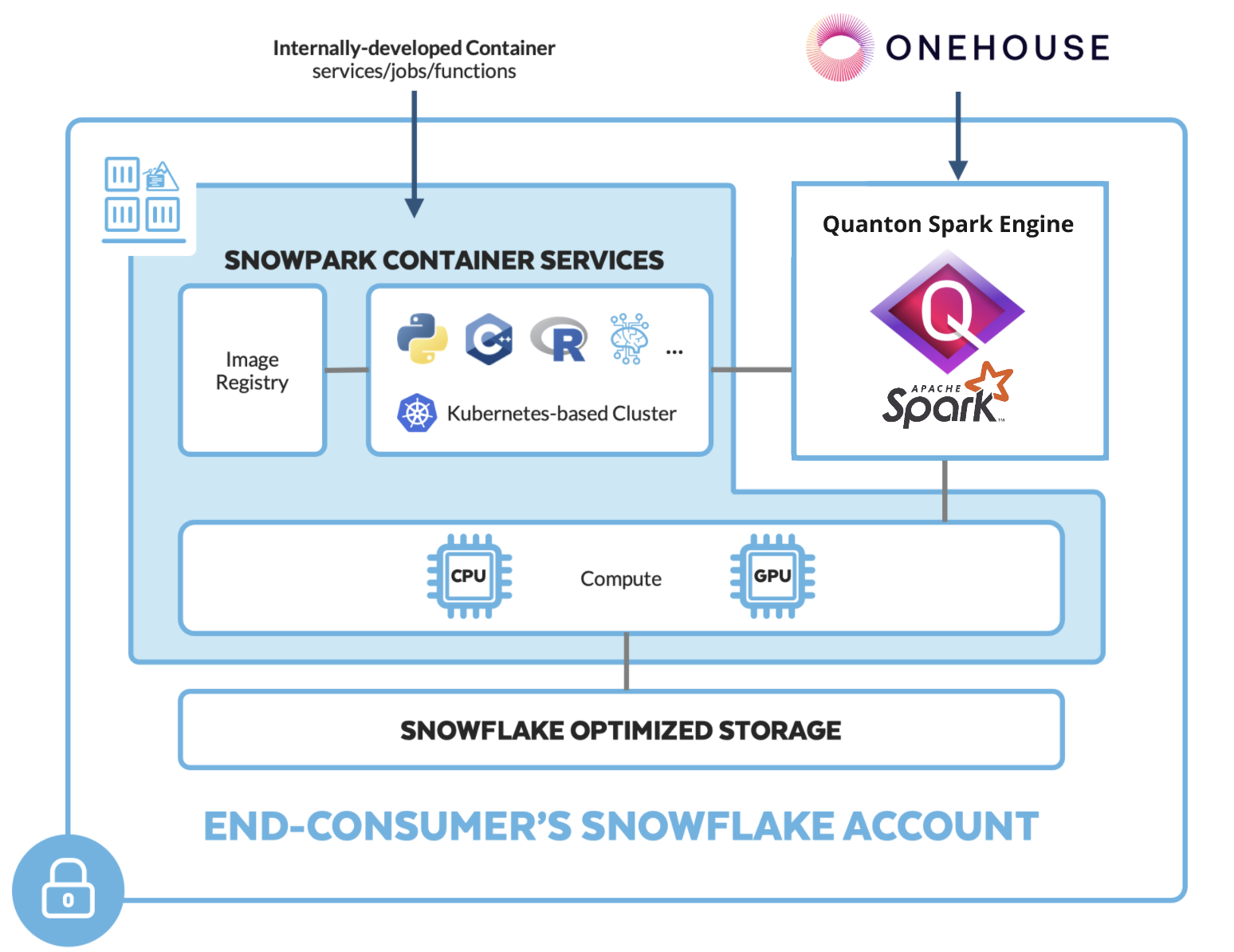
What is Quanton?
Quanton is a speed layer for Apache Spark, built by Onehouse. It replaces Spark's JVM execution engine with Velox — a vectorized, C++ runtime originally developed at Meta — so your existing Spark jobs run materially faster with no code changes. Same API, same DataFrame and SQL surface, same Hudi/Iceberg/Delta support. Just faster.
Running on Snowflake's infrastructure specifically, Quanton slots into Snowpark Container Services (SPCS): you bring your Spark workloads, Snowflake supplies the compute, and Quanton accelerates execution natively in C++. You control everything from Snowsight SQL worksheets — no cluster to manage, no custom Spark distribution to maintain.
What this guide covers: pushing the Quanton image to your Snowflake repository, storing a signed entitlement as a secret, standing up a distributed Spark cluster across several SPCS nodes, and submitting three jobs against it — a gate check that proves work is landing on multiple nodes, then a real Iceberg write and a Hudi write to S3. If you have a Snowflake account with ACCOUNTADMIN access, you can be running your first distributed job in under an hour.
This guide walks through running Quanton with Velox native execution on Snowflake Snowpark Container Services (SPCS). Everything an operator does is run from the Snowsight UI (SQL worksheets) — the only step that needs a command line is a one-time image push, which a user with Docker access performs once.
How it works
SPCS is a bring-your-own-image runtime: Snowflake runs your container image directly, with no Spark fork to bridge. Quanton is delivered inside the onehouse-values.yaml you download — as a single base64 blob carried in the spark.quanton.onehouse.config Spark conf. You store that blob once as a Snowflake secret; the job reads it from there and configures itself.
SPCS exposes no Kubernetes API, so Quanton cannot spawn executors as pods the way it does on a normal K8s cluster. Instead you run Spark Standalone: a long-running master service, a worker service, and a driver that submits against them.
quanton_master    (1 service, 1 instance)   — Spark Standalone master, port 7077
quanton_workers   (1 service, N instances)  — one Spark worker per instance
quanton_driver    (1 service, 1 instance)   — submits the job, hosts the SparkContext
Scale the cluster by changing MIN_INSTANCES / MAX_INSTANCES on the worker service — one
instance per worker. Decide the worker count before you submit, and size the compute pool to
workers + 2 nodes (the master and driver each take one).
SPCS compute pools are x86_64 only (
CPU_X64_*/HIGHMEM_X64_*).
Prerequisites
- A Snowflake account with the
ACCOUNTADMINrole and Snowsight UI access (to create compute pools, external access integrations, secrets, and image repositories) - A Quanton on Snowflake (SPCS) project and its
onehouse-values.yaml— see Project Creation - An S3 bucket and AWS credentials with read/write access (for the writes in Step 7a / 7b)
- One-time, command-line: a user with Docker and the Snowflake CLI (
snow) to publish the image (Step 4). Everything else is Snowsight.
Setup
Step 1: Create a project and download credentials
In the Onehouse console, click on the project name, then click Create New Project.

In the dialog box, give the project an appropriate name, select Quanton on Snowflake (SPCS) under Cloud Provider, and hit Save.
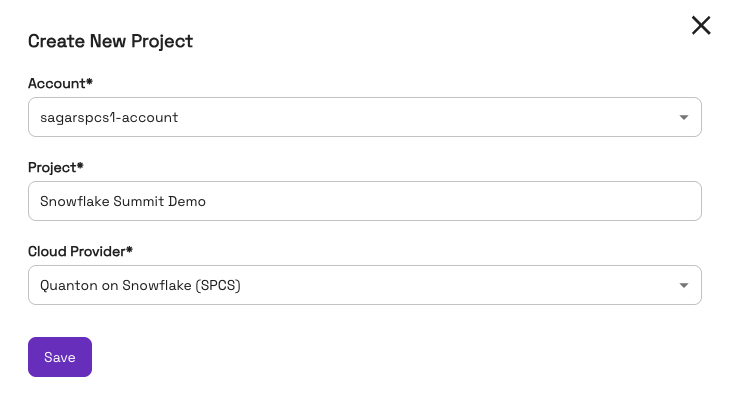
Download the resulting onehouse-values.yaml. It contains three things you'll use below:
| Value | Location in the file |
|---|---|
| Image | onehouseConfig.quantonSparkImage (use …v0.26.0-al2023 or newer for the distributed setup) |
| Image pull token | onehouseConfig.imagePullSecrets.accessToken |
| Entitlement blob | onehouseConfig.additionalSparkConfParameters."spark.quanton.onehouse.config" |
Step 2: Store your entitlement as a secret (Snowsight)
The entitlement blob holds a signed token and an mTLS client identity, so store it once as a Snowflake secret — encrypted at rest, and never pasted into a job. Open a SQL worksheet (role ACCOUNTADMIN) and run, pasting the spark.quanton.onehouse.config value from Step 1:
USE ROLE ACCOUNTADMIN;
CREATE DATABASE IF NOT EXISTS quanton_poc;
CREATE SCHEMA IF NOT EXISTS quanton_poc.spcs;

CREATE OR REPLACE SECRET quanton_poc.spcs.quanton_onehouse_config
  TYPE = GENERIC_STRING
  SECRET_STRING = '<paste the spark.quanton.onehouse.config value here>';
That's the only time you handle the blob. Every service reads it from this secret and derives everything else (cloud, environment) on its own — you never set those by hand.
Store your AWS credentials the same way, so they never appear inline in a job spec:
CREATE OR REPLACE SECRET quanton_poc.spcs.aws_key
  TYPE = GENERIC_STRING SECRET_STRING = '<your-access-key-id>';
CREATE OR REPLACE SECRET quanton_poc.spcs.aws_secret
  TYPE = GENERIC_STRING SECRET_STRING = '<your-secret-access-key>';
-- Only needed for temporary (STS/SSO) credentials. Create it empty for long-lived IAM keys.
CREATE OR REPLACE SECRET quanton_poc.spcs.aws_token
  TYPE = GENERIC_STRING SECRET_STRING = '<your-session-token>';
Step 3: Create Snowflake resources (Snowsight)
USE ROLE ACCOUNTADMIN;
USE SCHEMA quanton_poc.spcs;

-- Image repository — the push target for Step 4.
CREATE IMAGE REPOSITORY IF NOT EXISTS quanton_images;
SHOW IMAGE REPOSITORIES;   -- copy repository_url for Step 4

-- Egress: your S3 bucket AND the Onehouse control plane (the driver validates the
-- entitlement over mTLS against the control plane — this host is required).
-- List the bucket's virtual-hosted name explicitly; the S3 clients address buckets that way.
CREATE OR REPLACE NETWORK RULE quanton_egress_rule
  TYPE = HOST_PORT MODE = EGRESS
  VALUE_LIST = (
    'gwc.onehouse.ai:443',
    's3.<your-region>.amazonaws.com',
    '<your-bucket>.s3.<your-region>.amazonaws.com',
    'sts.<your-region>.amazonaws.com'
  );

CREATE OR REPLACE EXTERNAL ACCESS INTEGRATION quanton_eai
  ALLOWED_NETWORK_RULES = (quanton_egress_rule) ENABLED = TRUE;

-- Size the pool for the whole topology: 1 master + N workers + 1 driver.
-- Each pod below requests 4 vCPU, so on an *_X64_M family only one pod fits per node.
-- With 2 workers that is 4 pods -> 4 nodes. Under-size this and the driver sits
-- PENDING forever with "Unschedulable due to insufficient CPU resources."
CREATE COMPUTE POOL IF NOT EXISTS quanton_poc_pool
  MIN_NODES = 4 MAX_NODES = 4
  INSTANCE_FAMILY = HIGHMEM_X64_M
  AUTO_SUSPEND_SECS = 3600;

SHOW COMPUTE POOLS LIKE 'QUANTON_POC_POOL';  -- wait for state = ACTIVE (~2-3 min)
AUTO_SUSPEND_SECS is a safety net, not a substitute for Cleanup. A pool counts as
inactive only when no service or job is active on any node in it, so your running
master/worker/driver keep it active regardless of traffic — auto-suspend will not fire, and it
will not suspend the pool out from under a running job either. It only helps after you drop
your services, which is why Cleanup is still the step that stops the billing.
Copy the repository_url from SHOW IMAGE REPOSITORIES; it has the form
<account>.registry.snowflakecomputing.com/quanton_poc/spcs/quanton_images.
Step 4: Publish the image to your SPCS repository (one-time, command line)
SPCS only runs images from your account's own image repository, and pushing requires Docker — this is the single step that isn't done in Snowsight. A user with access to Docker + snow installed can complete this.
SPCS also can't run a vanilla Spark image directly, so wrap the Onehouse image with a tiny Dockerfile:
ARG BASE=dist.onehouse.ai/onehouseai/quanton-spark:quanton-operator-release-v0.26.0-al2023
FROM --platform=linux/amd64 ${BASE}
USER root
RUN yum install -y hostname
COPY gate_check.py /opt/spark/scripts/gate_check.py
COPY iceberg_write.py /opt/spark/scripts/iceberg_write.py
COPY hudi_write.py /opt/spark/scripts/hudi_write.py
Save the three job scripts from Step 6, Step 7a, and Step 7b next to the Dockerfile, then build and push (use the repository_url from Step 3):
# Pull the base image (token = imagePullSecrets.accessToken from onehouse-values.yaml)
echo "<image-pull-token>" | docker login dist.onehouse.ai -u onehouseai --password-stdin

# Push target = your Snowflake registry
snow spcs image-registry login
REPO=<repository_url>     # from Step 3
docker buildx build --platform linux/amd64 -t $REPO/quanton-spark-sfcs:v1 --load .
docker push $REPO/quanton-spark-sfcs:v1
Your image URI is <repository_url>/quanton-spark-sfcs:v1 — used in every step below. To confirm the push (back in Snowsight), SHOW IMAGES IN IMAGE REPOSITORY quanton_poc.spcs.quanton_images; lists each image's image_path — the full image: value is your registry host (the part of repository_url before the first /) followed by that image_path.
Run a job (multi-node)
The only thing you fill in below is your image URI (and, for the writes, your S3 bucket and region). The entitlement and AWS credentials come from the secrets you created in Step 2.
Step 5: Start the Spark cluster
Both services are long-running — bring them up once, then submit as many jobs as you like against them.
First the master:
USE ROLE ACCOUNTADMIN;
USE SCHEMA quanton_poc.spcs;
DROP SERVICE IF EXISTS quanton_master;

CREATE SERVICE quanton_master
  IN COMPUTE POOL quanton_poc_pool
  EXTERNAL_ACCESS_INTEGRATIONS = (quanton_eai)
  MIN_INSTANCES = 1 MAX_INSTANCES = 1
  FROM SPECIFICATION $$
  spec:
    containers:
      - name: master
        image: <your-image-uri>
        command:
          - /bin/bash
          - -c
          - |
            # $HOSTNAME is set by bash itself; the AL2023 minimal base has no `hostname` binary.
            export SPARK_MASTER_HOST="${HOSTNAME}"
            /opt/spark/sbin/start-master.sh
            exec tail -F /opt/spark/logs/spark-*-org.apache.spark.deploy.master.Master-*.out
        resources:
          requests: {cpu: "4", memory: "12Gi"}
          limits:   {cpu: "5", memory: "24Gi"}
        volumeMounts:
          - name: master-logs
            mountPath: /opt/spark/logs
    endpoints:
      - name: spark
        port: 7077
        protocol: TCP
      - name: webui
        port: 8080
        public: true
    volumes:
      - name: master-logs
        source: local
  $$;
Then the workers — one service, one instance per worker. Set both MIN_INSTANCES and
MAX_INSTANCES to the worker count you sized the pool for (2 below):
USE ROLE ACCOUNTADMIN;
USE SCHEMA quanton_poc.spcs;
DROP SERVICE IF EXISTS quanton_workers;

CREATE SERVICE quanton_workers
  IN COMPUTE POOL quanton_poc_pool
  EXTERNAL_ACCESS_INTEGRATIONS = (quanton_eai)
  MIN_INSTANCES = 2 MAX_INSTANCES = 2
  FROM SPECIFICATION $$
  spec:
    containers:
      - name: worker
        image: <your-image-uri>
        secrets:
          - snowflakeSecret: quanton_poc.spcs.quanton_onehouse_config
            secretKeyRef: secret_string
            envVarName: QUANTON_ONEHOUSE_CONFIG
          - snowflakeSecret: quanton_poc.spcs.aws_key
            secretKeyRef: secret_string
            envVarName: OH_AWS_KEY
          - snowflakeSecret: quanton_poc.spcs.aws_secret
            secretKeyRef: secret_string
            envVarName: OH_AWS_SECRET
          - snowflakeSecret: quanton_poc.spcs.aws_token
            secretKeyRef: secret_string
            envVarName: OH_AWS_TOKEN
        command:
          - /bin/bash
          - -c
          - |
            # SPCS internal DNS uses hyphens where object names use underscores, and
            # java.net.URI rejects underscores in hostnames — so resolve to an IP here
            # and let Spark see only the IP.
            MASTER_FQDN="quanton-master.spcs.quanton-poc.snowflakecomputing.internal"
            MASTER_IP=$(python3 -c "import socket; print(socket.gethostbyname('${MASTER_FQDN}'))")
            echo "[worker] Master: ${MASTER_FQDN} -> ${MASTER_IP}"

            # AWS credentials must reach the SDK through the *profile chain*, not as
            # AWS_ACCESS_KEY_ID env vars. The native Velox S3 client has no session-token
            # field, and static env vars win the default chain and drop the token -> 403.
            # Writing a profile file keeps temporary credentials intact.
            mkdir -p /opt/aws
            { echo "[default]"
              echo "aws_access_key_id=${OH_AWS_KEY}"
              echo "aws_secret_access_key=${OH_AWS_SECRET}"
              [ -n "${OH_AWS_TOKEN}" ] && echo "aws_session_token=${OH_AWS_TOKEN}"
              echo "region=<your-region>"
            } > /opt/aws/credentials
            export AWS_SHARED_CREDENTIALS_FILE=/opt/aws/credentials
            export AWS_CREDENTIAL_PROFILES_FILE=/opt/aws/credentials
            unset OH_AWS_KEY OH_AWS_SECRET OH_AWS_TOKEN

            # Executors are child processes of this worker, and their native JWT validator
            # reads the entitlement from disk. The driver's plugin writes these files for
            # itself, but the executors need their own copy or they abort with
            # "Cannot open file: /var/run/secrets/quanton/issuer/public-cert.pem".
            python3 - <<'PYEOF'
            import base64, json, os
            d = json.loads(base64.b64decode(os.environ["QUANTON_ONEHOUSE_CONFIG"]))
            base = "/var/run/secrets/quanton"
            for sub in ("issuer", "token", "mtls"):
                os.makedirs(f"{base}/{sub}", exist_ok=True)
            open(f"{base}/issuer/public-cert.pem", "w").write(d["publicCert"])
            open(f"{base}/token/JWT_TOKEN", "w").write(d["jwtToken"])
            open(f"{base}/mtls/client-cert.pem", "w").write(d["mtls"]["clientCert"])
            open(f"{base}/mtls/client-key.pem", "w").write(d["mtls"]["clientKey"])
            print("[worker] materialized entitlement under", base)
            PYEOF

            /opt/spark/sbin/start-worker.sh "spark://${MASTER_IP}:7077"

            # SPCS logs only show this container's PID 1 (the worker daemon), not the child
            # executor JVMs. Tail their stderr so executor-side failures are visible.
            ( while true; do
                for f in /opt/spark/work/*/*/stderr; do
                  [ -f "$f" ] && echo "===== EXECUTOR STDERR: $f =====" && tail -n 60 "$f"
                done
                sleep 8
              done ) &

            exec tail -F /opt/spark/logs/spark-*-org.apache.spark.deploy.worker.Worker-*.out
        env:
          AWS_REGION: "<your-region>"
        resources:
          requests: {cpu: "4", memory: "12Gi"}
          limits:   {cpu: "5", memory: "24Gi"}
        volumeMounts:
          - name: shuffle-spill
            mountPath: /tmp
    endpoints:
      # Required, and it is what makes one multi-instance worker service work: instances of
      # the same service can reach each other only on DECLARED endpoints — traffic to an
      # undeclared port is dropped silently. Executors fetch shuffle blocks from each other
      # on 34568, which the driver pins with --conf spark.blockManager.port=34568 (Step 7).
      # Keep those two numbers in sync, and keep one executor per instance: a second
      # executor on the same instance cannot bind 34568, increments to 34569, and its
      # fetches are dropped with no error.
      - name: blockmanager
        port: 34568
        protocol: TCP
    volumes:
      - name: shuffle-spill
        source: local
  $$;
Confirm every worker registered before submitting anything:
CALL SYSTEM$GET_SERVICE_LOGS('quanton_poc.spcs.quanton_master', 0, 'master', 200);
Look for one Registering worker … line per worker. You can also open the master's webui
endpoint (SHOW ENDPOINTS IN SERVICE quanton_master;) to see them in the Spark UI.
Step 6: Run the gate-check (optional)
Skip straight to Step 7a if you want the Iceberg result and nothing else — this step diagnoses rather than accomplishes.
It is worth running once on a new deployment: this in-memory job (no S3) confirms the entitlement is accepted, Velox is live, and — the part that matters here — that tasks are actually landing on more than one node, which isolates cluster problems from S3 problems before any storage is involved. Save it as gate_check.py for the Step 4 build:
import socket
from pyspark.sql import SparkSession, functions as F

spark = SparkSession.builder.appName("QuantonSFCS-GateCheck").getOrCreate()
sc = spark.sparkContext
print("[gate] SparkSession started — entitlement accepted")
print("[gate] plugins:", spark.conf.get("spark.plugins", "<unset>"))
print("[gate] shuffle manager:", spark.conf.get("spark.shuffle.manager", "<default>"))

# Distinct executor pod IPs. NOT socket.gethostname(): every SPCS pod is named
# "statefulset-0" inside its own service, so hostnames always collapse to one.
hosts = sorted(set(sc.parallelize(range(40), 40)
                     .map(lambda _: socket.gethostbyname(socket.gethostname()))
                     .distinct().collect()))
print(f"[gate] EXECUTOR HOSTS ({len(hosts)}): {hosts}")
assert len(hosts) >= 2, "tasks ran on <2 hosts — not actually distributed"

df = (spark.range(0, 1_000_000).withColumn("b", F.col("id") % 1000)
      .groupBy("b").agg(F.count(F.lit(1)).alias("c")))
assert df.count() == 1000
print("[gate] PASS — Quanton backend up, distributed, and query correct")
The driver runs as its own service. It is created with CREATE SERVICE rather than
EXECUTE JOB SERVICE on purpose: SPCS deletes a job service the instant the statement
returns, so a failed driver's logs become unreachable within seconds. This spec keeps the
container alive after the job exits so you can always read the log.
USE ROLE ACCOUNTADMIN;
USE SCHEMA quanton_poc.spcs;
DROP SERVICE IF EXISTS quanton_driver;

CREATE SERVICE quanton_driver
  IN COMPUTE POOL quanton_poc_pool
  EXTERNAL_ACCESS_INTEGRATIONS = (quanton_eai)
  MIN_INSTANCES = 1 MAX_INSTANCES = 1
  FROM SPECIFICATION $$
  spec:
    containers:
      - name: driver
        image: <your-image-uri>
        secrets:
          - snowflakeSecret: quanton_poc.spcs.quanton_onehouse_config
            secretKeyRef: secret_string
            envVarName: QUANTON_ONEHOUSE_CONFIG
        command:
          - /bin/bash
          - -c
          - |
            MASTER_FQDN="quanton-master.spcs.quanton-poc.snowflakecomputing.internal"
            MASTER_IP=$(python3 -c "import socket; print(socket.gethostbyname('${MASTER_FQDN}'))")
            # Executors dial the driver back, so it must advertise its own pod IP.
            DRIVER_IP=$(python3 -c "import socket; print(socket.gethostbyname(socket.gethostname()))")
            echo "[driver] master=${MASTER_IP} driver=${DRIVER_IP}"

            echo "spark.quanton.onehouse.config ${QUANTON_ONEHOUSE_CONFIG}" >> /opt/spark/conf/spark-defaults.conf

            /opt/spark/bin/spark-submit --master "spark://${MASTER_IP}:7077" \
              --conf spark.quanton.standalone.mode=true \
              --conf spark.driver.host=${DRIVER_IP} \
              --conf spark.driver.bindAddress=0.0.0.0 \
              --conf spark.driver.port=34567 \
              --conf spark.blockManager.port=34568 \
              --conf spark.memory.offHeap.enabled=true \
              --conf spark.memory.offHeap.size=4g \
              --conf spark.serializer=org.apache.spark.serializer.KryoSerializer \
              --conf spark.executor.memory=6g \
              --conf spark.executor.cores=4 \
              --conf spark.executor.instances=2 \
              --driver-memory 4g \
              /opt/spark/scripts/gate_check.py
            echo "[driver] EXITED rc=$?"
            sleep 1800   # keep logs readable; Cleanup drops this service
        resources:
          requests: {cpu: "4", memory: "12Gi"}
          limits:   {cpu: "5", memory: "24Gi"}
        volumeMounts:
          - name: driver-tmp
            mountPath: /tmp
    endpoints:
      - name: driver
        port: 34567
        protocol: TCP
      - name: blockmanager
        port: 34568
        protocol: TCP
    volumes:
      - name: driver-tmp
        source: local
  $$;
Check the result (the tail lines argument is capped at 1000 — a larger value fails the whole call):
CALL SYSTEM$GET_SERVICE_LOGS('quanton_poc.spcs.quanton_driver', 0, 'driver', 1000);
Success looks like:
[gate] SparkSession started — entitlement accepted
spark_native_listener: Extracted identity from mTLS cert org_id=…
[gate] EXECUTOR HOSTS (2): ['10.244.8.204', '10.244.9.11']
[gate] PASS — Quanton backend up, distributed, and query correct
Two distinct IPs is the proof that the cluster is genuinely distributed.
Step 7a: Run an Iceberg write
Write a sample Iceberg table to S3 using a Hadoop catalog. Save as iceberg_write.py for the Step 4 build:
import sys
from pyspark.sql import SparkSession
from pyspark.sql.types import StructType, StructField, StringType, IntegerType, DoubleType

spark = SparkSession.builder.appName("QuantonSFCS-IcebergWrite").getOrCreate()
warehouse = sys.argv[1].rstrip("/")
schema = StructType([
    StructField("order_id", StringType(), False), StructField("product", StringType(), False),
    StructField("quantity", IntegerType(), False), StructField("price", DoubleType(), False),
    StructField("region", StringType(), False),
])
regions = ["US", "UK", "SG", "AU", "MX"]
rows = [(f"ORD{i:04d}", "Widget", (i % 5) + 1, round(9.99 + i, 2), regions[i % 5]) for i in range(1000)]
df = spark.createDataFrame(rows, schema)
spark.sql("CREATE NAMESPACE IF NOT EXISTS demo.sample_db")
# repartition so the write itself fans out across executors
(df.repartition(4).writeTo("demo.sample_db.quanton_spcs_orders")
   .using("iceberg")
   .partitionedBy(df.region)
   .createOrReplace())
cnt = spark.table("demo.sample_db.quanton_spcs_orders").count()
print(f"[iceberg] write complete: {warehouse} table=demo.sample_db.quanton_spcs_orders rows={cnt}")
assert cnt == 1000
print("[iceberg] PASS — Iceberg table written and readable")
The Iceberg Spark runtime ships in the image under /opt/spark/user-jars/, so add that directory to the classpath and point a Hadoop catalog at your S3 warehouse. Recreate the driver service with this spark-submit in place of the gate-check one — everything else in the spec is unchanged, plus the three AWS secrets from the worker spec:
USE ROLE ACCOUNTADMIN;
USE SCHEMA quanton_poc.spcs;
DROP SERVICE IF EXISTS quanton_driver;

CREATE SERVICE quanton_driver
  IN COMPUTE POOL quanton_poc_pool
  EXTERNAL_ACCESS_INTEGRATIONS = (quanton_eai)
  MIN_INSTANCES = 1 MAX_INSTANCES = 1
  FROM SPECIFICATION $$
  spec:
    containers:
      - name: driver
        image: <your-image-uri>
        secrets:
          - snowflakeSecret: quanton_poc.spcs.quanton_onehouse_config
            secretKeyRef: secret_string
            envVarName: QUANTON_ONEHOUSE_CONFIG
          - snowflakeSecret: quanton_poc.spcs.aws_key
            secretKeyRef: secret_string
            envVarName: OH_AWS_KEY
          - snowflakeSecret: quanton_poc.spcs.aws_secret
            secretKeyRef: secret_string
            envVarName: OH_AWS_SECRET
          - snowflakeSecret: quanton_poc.spcs.aws_token
            secretKeyRef: secret_string
            envVarName: OH_AWS_TOKEN
        command:
          - /bin/bash
          - -c
          - |
            MASTER_FQDN="quanton-master.spcs.quanton-poc.snowflakecomputing.internal"
            MASTER_IP=$(python3 -c "import socket; print(socket.gethostbyname('${MASTER_FQDN}'))")
            DRIVER_IP=$(python3 -c "import socket; print(socket.gethostbyname(socket.gethostname()))")

            mkdir -p /opt/aws
            { echo "[default]"
              echo "aws_access_key_id=${OH_AWS_KEY}"
              echo "aws_secret_access_key=${OH_AWS_SECRET}"
              [ -n "${OH_AWS_TOKEN}" ] && echo "aws_session_token=${OH_AWS_TOKEN}"
              echo "region=<your-region>"
            } > /opt/aws/credentials
            export AWS_SHARED_CREDENTIALS_FILE=/opt/aws/credentials
            export AWS_CREDENTIAL_PROFILES_FILE=/opt/aws/credentials
            unset OH_AWS_KEY OH_AWS_SECRET OH_AWS_TOKEN

            echo "spark.quanton.onehouse.config ${QUANTON_ONEHOUSE_CONFIG}" >> /opt/spark/conf/spark-defaults.conf

            /opt/spark/bin/spark-submit --master "spark://${MASTER_IP}:7077" \
              --conf spark.quanton.standalone.mode=true \
              --conf spark.driver.host=${DRIVER_IP} \
              --conf spark.driver.bindAddress=0.0.0.0 \
              --conf spark.driver.port=34567 \
              --conf spark.blockManager.port=34568 \
              --conf spark.memory.offHeap.enabled=true \
              --conf spark.memory.offHeap.size=4g \
              --conf spark.serializer=org.apache.spark.serializer.KryoSerializer \
              --conf spark.executor.memory=6g \
              --conf spark.executor.cores=4 \
              --conf spark.executor.instances=2 \
              --conf spark.driver.extraClassPath=/opt/spark/user-jars/* \
              --conf spark.executor.extraClassPath=/opt/spark/user-jars/* \
              --conf spark.hadoop.fs.s3a.endpoint=https://s3.<your-region>.amazonaws.com \
              --conf spark.hadoop.fs.s3a.connection.ssl.enabled=true \
              --conf spark.hadoop.fs.s3a.endpoint.region=<your-region> \
              --conf spark.hadoop.fs.s3a.aws.credentials.provider=com.amazonaws.auth.profile.ProfileCredentialsProvider \
              --conf spark.hadoop.fs.s3a.instance.credentials=true \
              --conf spark.sql.extensions=org.apache.iceberg.spark.extensions.IcebergSparkSessionExtensions \
              --conf spark.sql.catalog.demo=org.apache.iceberg.spark.SparkCatalog \
              --conf spark.sql.catalog.demo.type=hadoop \
              --conf spark.sql.catalog.demo.warehouse=s3a://<your-bucket>/<your-path>/iceberg-warehouse \
              --driver-memory 4g \
              /opt/spark/scripts/iceberg_write.py s3a://<your-bucket>/<your-path>/iceberg-warehouse
            echo "[driver] EXITED rc=$?"
            sleep 1800
        resources:
          requests: {cpu: "4", memory: "12Gi"}
          limits:   {cpu: "5", memory: "24Gi"}
        volumeMounts:
          - name: driver-tmp
            mountPath: /tmp
    endpoints:
      - name: driver
        port: 34567
        protocol: TCP
      - name: blockmanager
        port: 34568
        protocol: TCP
    volumes:
      - name: driver-tmp
        source: local
  $$;
https:// on fs.s3a.endpoint is requiredWithout an explicit scheme the native Velox S3 client dials S3 over plaintext HTTP on port 80. SPCS egress rules that list a bare hostname allow :443 only, so the port-80 connection is silently blackholed and the query hangs forever with no error — the JVM's own timeouts never fire, because the wait happens inside native code. Always pair https:// with spark.hadoop.fs.s3a.connection.ssl.enabled=true.
CALL SYSTEM$GET_SERVICE_LOGS('quanton_poc.spcs.quanton_driver', 0, 'driver', 1000);
Expected: Committed snapshot …, [iceberg] write complete: …, and [iceberg] PASS.
Step 7b: Run a Hudi write (optional)
An alternative table format, not a further step — if Step 7a passed, your cluster is working and you can stop there. Do this one if you want Hudi instead of, or alongside, Iceberg. Save as hudi_write.py for the Step 4 build:
import sys
from pyspark.sql import SparkSession
from pyspark.sql.types import StructType, StructField, StringType, IntegerType, DoubleType

spark = SparkSession.builder.appName("QuantonSFCS-HudiWrite").getOrCreate()
path = sys.argv[1].rstrip("/") + "/quanton_spcs_orders"
schema = StructType([
    StructField("order_id", StringType(), False), StructField("product", StringType(), False),
    StructField("quantity", IntegerType(), False), StructField("price", DoubleType(), False),
    StructField("region", StringType(), False),
])
regions = ["US", "UK", "SG", "AU", "MX"]
rows = [(f"ORD{i:04d}", "Widget", (i % 5) + 1, round(9.99 + i, 2), regions[i % 5]) for i in range(1000)]
df = spark.createDataFrame(rows, schema)
df.write.format("hudi").options(**{
    "hoodie.table.name": "quanton_spcs_orders",
    "hoodie.datasource.write.recordkey.field": "order_id",
    "hoodie.datasource.write.partitionpath.field": "region",
    "hoodie.datasource.write.operation": "bulk_insert",
    "hoodie.datasource.write.table.type": "COPY_ON_WRITE",
    "hoodie.metadata.enable": "false",
    "hoodie.write.markers.type": "DIRECT",
    "hoodie.embed.timeline.server": "false",
}).mode("overwrite").save(path)
print(f"[hudi] write complete: {path}")
Submit it exactly as in Step 7a — same driver spec, same AWS secrets, same https:// endpoint — with the Iceberg catalog/classpath confs dropped and the last line replaced by:
/opt/spark/scripts/hudi_write.py s3a://<your-bucket>/<your-path>
CALL SYSTEM$GET_SERVICE_LOGS('quanton_poc.spcs.quanton_driver', 0, 'driver', 1000);
Expected: Commit … successful! and [hudi] write complete: …. The Validation failed for plan: AppendData … FallbackByBackendSettings line is normal — Velox runs the read/aggregation natively and hands the Hudi write back to Spark.
Cleanup
This step is required. Your services keep the pool active, and an active pool bills — so
AUTO_SUSPEND_SECS cannot rescue you until the services are gone. Drop them, then suspend the
pool. Anything left behind on the pool, including a finished job service, keeps it active.
USE SCHEMA quanton_poc.spcs;
DROP SERVICE IF EXISTS quanton_driver;
DROP SERVICE IF EXISTS quanton_workers;
DROP SERVICE IF EXISTS quanton_master;

SHOW SERVICES IN SCHEMA quanton_poc.spcs;      -- nothing should remain on the pool

ALTER COMPUTE POOL quanton_poc_pool SET MIN_NODES = 1 MAX_NODES = 1 AUTO_SUSPEND_SECS = 300;
ALTER COMPUTE POOL quanton_poc_pool SUSPEND;   -- or DROP COMPUTE POOL to remove entirely

SHOW COMPUTE POOLS LIKE 'QUANTON_POC_POOL';    -- confirm state = SUSPENDED, active_nodes = 0
Troubleshooting
The job hangs forever with no error
Almost always egress. The native Velox S3 client dials port 80 unless you give spark.hadoop.fs.s3a.endpoint an explicit https:// scheme, and SPCS egress rules listing a bare hostname permit :443 only — so the connection is blackholed at the TCP handshake. Because the wait happens inside native code, spark.network.timeout and task interrupts never fire and nothing is logged. Set https:// on the endpoint plus spark.hadoop.fs.s3a.connection.ssl.enabled=true.
The other cause is a shuffle port that is not declared. Instances of the worker service reach each other only on the ports listed in the spec's endpoints, and traffic to an undeclared port is dropped with no error. Check that the worker declares 34568 and that the driver passes --conf spark.blockManager.port=34568, and that only one executor runs per instance — a second executor on the same instance cannot bind 34568 and silently increments to an undeclared 34569.
AWSBadRequestException … Status Code: 400; Error Code: 400 Bad Request
An opaque 400 on the first S3 call is usually an expired session token. S3 answers an expired token with HTTP 400 (not 403), and Hadoop's first call is a HEAD, whose response carries no XML body — so the real <Code>ExpiredToken</Code> is discarded and you see only a bare 400.
Refresh the credentials and update the secrets from Step 2. Note that "the credentials are set" is not the same as "the credentials are valid" — verify with aws sts get-caller-identity using the exact values you are about to store.
403 from S3 despite correct credentials
You are passing credentials as AWS_ACCESS_KEY_ID / AWS_SECRET_ACCESS_KEY env vars. The native Velox S3 client has no session-token field, and static env vars outrank other sources in the AWS credential chain — so the session token gets dropped and temporary credentials fail. Write a profile file and point AWS_SHARED_CREDENTIALS_FILE at it, as the Step 5 specs do.
No JWT token found at startup
The image is older than v0.18.0, or the secret is empty / wasn't injected. Use a v0.26.0-al2023+ image, and confirm the secrets: block references quanton_poc.spcs.quanton_onehouse_config.
Cannot open file: /var/run/secrets/quanton/issuer/public-cert.pem
An executor failed entitlement validation. Executors are child processes of the worker container and read the entitlement from disk, so each worker must materialize those files at startup — that's the python3 block in the Step 5 worker spec. Confirm QUANTON_ONEHOUSE_CONFIG is injected into the worker services, not just the driver.
requires valid controlPlaneCloud / controlPlaneEnvironment
Quanton sets these from the entitlement blob automatically. This error means its config bundle didn't run — usually because a conflicting conf (most often spark.shuffle.manager) made Quanton skip it, or the secret is empty. Remove any spark.shuffle.manager override and confirm the secret holds the full spark.quanton.onehouse.config string.
requires ColumnarShuffleManager but found SortShuffleManager
Don't add a spark.shuffle.manager conf — Quanton sets the columnar one itself.
mTLS / connection timeout to the control plane
Add your Onehouse gateway host (<environment>-gwc.onehouse.ai) on port 443 to the egress network rule. Note the entitlement expires (7-day default) — re-download onehouse-values.yaml and update the secret (CREATE OR REPLACE SECRET …) to refresh it.
Driver stuck PENDING: "Unschedulable due to insufficient CPU resources"
The pool has fewer nodes than the topology needs. Each pod here requests 4 vCPU, so on an *_X64_M family only one pod fits per node: size the pool to workers + 2 (master + driver). You can ALTER COMPUTE POOL … SET MIN_NODES while a pod is pending and it will schedule without restarting the run.
Unable to retrieve logs / a running container that logs nothing
Either the container hasn't started yet, or the log call itself failed. SYSTEM$GET_SERVICE_LOGS caps its tail lines argument at 1000 — passing a larger value fails the entire call, which looks identical to a silent container. A RUNNING container printing zero lines means the fetch is broken, not that the job is quiet.
Compute pool stuck in STARTING
HIGHMEM_X64_M availability varies by region; ALTER COMPUTE POOL quanton_poc_pool SUSPEND; then RESUME; to retry, or try another *_X64_* family.
Next steps
- Running Jobs — submit your own Spark jobs
- AWS integration reference — S3 access and credentials